Helix Self Healing
Helix is an intelligent SaaS remediation platform laser focused on eliminating manual tasks that IT administrators hate performing. Helix uses a SaaS delivery model to keep your Unitrends backup appliances and protected assets healthy, no matter where they are located.
This Helix release targets Unitrends appliance updates, Windows Volume Shadow Copy Services (VSS), and HDD/SSD disk health monitoring leveraging Self-Monitoring, Analysis, and Reporting Technology (SMART). The Standard edition of Helix enables automated appliance updates and is available with all licensed Unitrends appliances. Add the Premium edition to detect and remediate Windows VSS and HDD/SSD disk issues.
Helix appliance updates
Keeping your Unitrends appliances up to date is critical for optimal security and performance, and enables you to benefit from the latest features and fixes. Helix checks for appliance updates and automatically installs them as they become available, ensuring you have the latest enhancements at your disposal.
 How it works
Start by opting in to automated appliance updates, as described in To configure automated appliance updates. Helix then periodically checks for available updates. If an update is found, Helix creates a pending install task and runs the install as soon as there are no actively running backup or recovery jobs. (Note that the install terminates any running backup copy jobs.)
To configure automated appliance updates
1. Ensure that these prerequisites have been met:
● The appliance must be running release 10.4.3 or higher. If needed, install appliance updates.
● Outbound Helix communication and updates are performed over the following ports:
|
Port, Protocol, and Rule |
Hostname or IP Address |
|---|---|
|
5721: ● TCP ● UDP ● Outbound |
173.247.66.64 |
|
443: ● HTTPS ● Outbound |
kaseyagroup-appliance-registry.jfrog.io |
|
443: ● HTTPS ● Outbound |
repo.unitrends.com |
2. Log in to the appliance UI.
You must log in directly to the appliance. You cannot configure automated updates for a managed appliance.
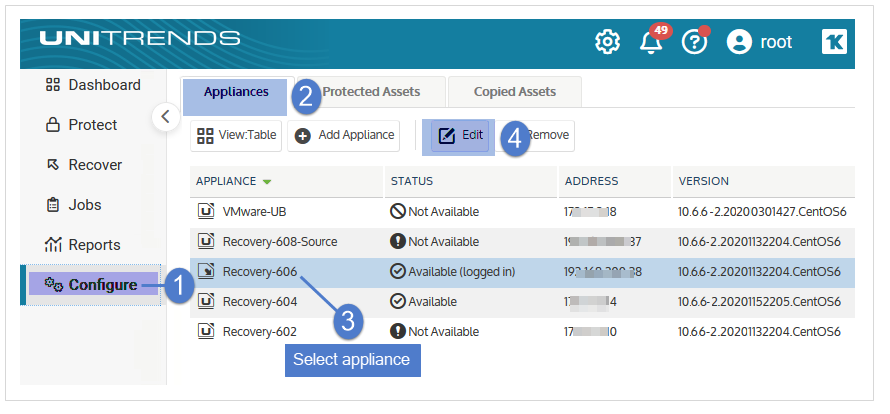
3. On the Configure > Appliances page, select the appliance and click Edit.
4. Select Email and specify the recipient where Helix notifications will be sent:
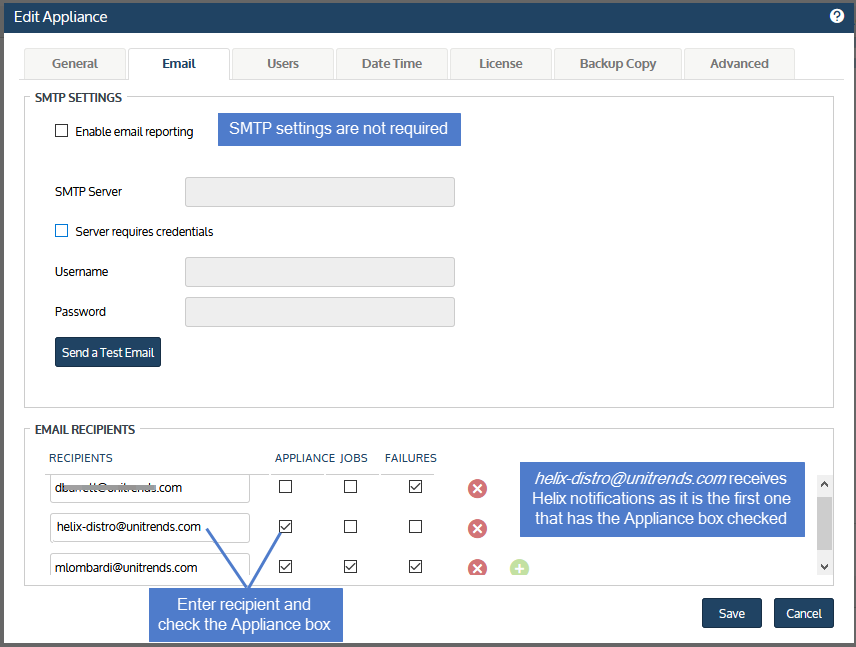
● Helix sends email notifications to the first recipient that has the Appliance box checked. Unitrends recommends that you use an email distribution list to ensure uninterrupted receipt of notifications as employee roles change in your company.
● SMTP configuration is not required because notifications are sent from Helix (rather than from the appliance itself). Helix notifications are sent regardless of whether SMTP has been configured on the appliance.
● Notifications are sent from this address: Helix@unitrends.com. Ensure that your SMTP server is configured to accept notifications from this address.
5. Click Advanced and select Support Toolbox.
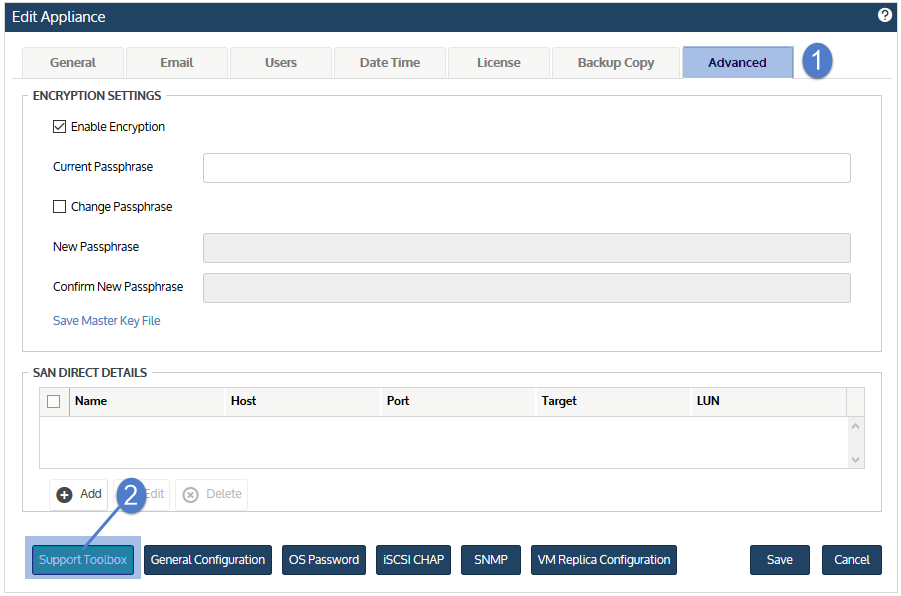
The Support Toolbox (Advanced) dialog displays.
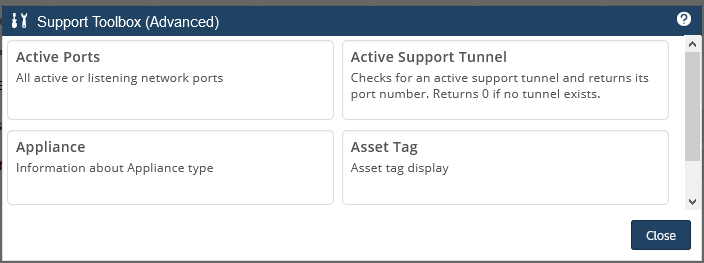
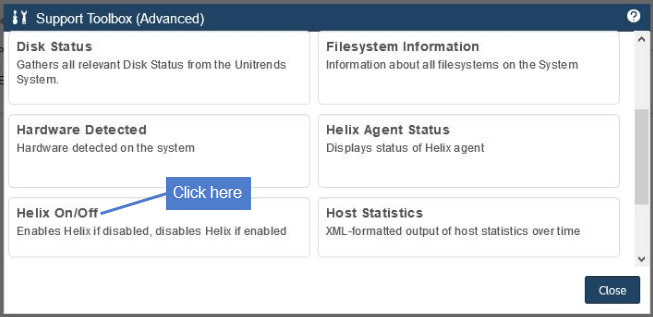
6. Scroll down and click Helix On/Off to enable Helix.
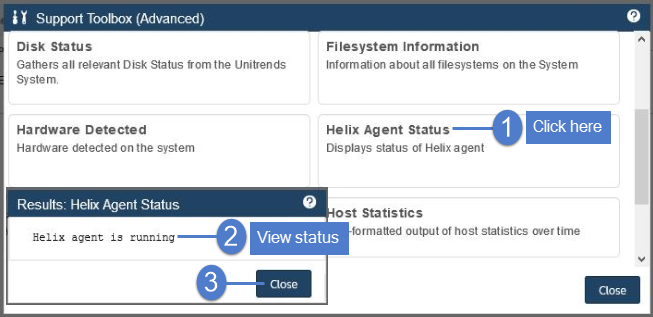
To verify that Helix has been enabled, click Helix Agent Status:
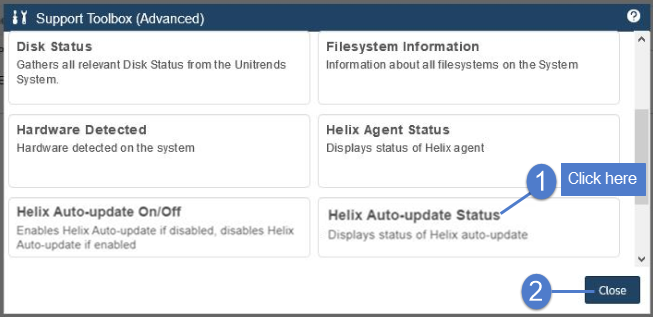
7. Click Helix Auto-update On/Off to enable automated updates:
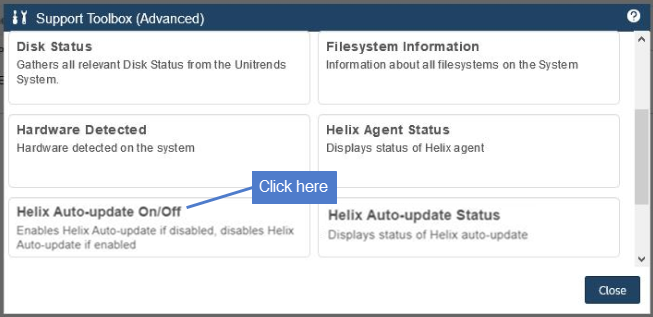
To verify that the auto update feature has been enabled, click Helix Auto-update Status:
VSS monitoring and remediation with Helix
Backup is the last line of defense to a myriad of threats to your data. Successful backups cannot happen without your environment cooperating. It is your responsibility to monitor, detect, and remediate conditions that impact backups. Unitrends Helix is the intelligent engine that automates these tasks so you can focus on more important ones.
Troubleshooting environmental issues that impact backups wastes valuable time. Helix identifies and fixes the most common backup problems, without you lifting a finger. Volume Shadow Copy Services (VSS) are critical for data protection, but are the most commonly reported root cause for backup failures. Helix monitors your protected Windows assets and remediates VSS issues proactively— saving you from spending time analyzing logs and calling Support. But VSS remediation is just the beginning. Over time, Helix will be enhanced to intelligently increase Recovery Point Objectives (RPOs) and automate recoveries after certain failure conditions.
To use this feature, contact your Unitrends Sales Representative to purchase Helix Premium. Upon purchasing Helix Premium, you receive a Welcome email containing a link you can use to download the Helix agent. Then simply install the Helix agent on your protected Windows assets, either manually or to multiple assets by using your endpoint management tool. Once the agent is installed, Helix automatically starts detecting and fixing a variety of VSS issues. If an issue is detected, Helix sends an email notification about the error and fix.
NOTE See Installing the Helix agent for agent requirements and installation procedures.
HDD/SSD disk monitoring and remediation with Helix
Helix leverages Self-Monitoring, Analysis, and Reporting Technology (SMART) to check the disk health of your protected Windows assets and notify you if a drive is in need of repair or is no longer reliable. To use this feature, contact your Unitrends Sales Representative to purchase Helix Premium. Upon purchasing Helix Premium, you receive a Welcome email containing a link you can use to download the Helix agent. Then simply install the Helix agent on your protected Windows assets, either manually or to multiple assets by using your endpoint management tool.
NOTE See Installing the Helix agent for agent requirements and installation procedures.
Once the agent is installed, Helix automatically runs SMART disk status checks daily and sends an email notification when a drive has flagged a general SMART status other than OK. The email notification includes the status returned, as well as information about the Windows asset. The purpose of this alert is to help identify hard drives that may be in a pre-failure or error state in the Windows systems that Unitrends protects.
Next steps upon receiving a Helix SMART notification
The Helix SMART disk drive notification indicates that the Windows management interface on your machine has detected a SMART issue on one or more of its hard drives. This alert is typically, but not always, raised before a drive completely fails. Receipt of such an alert may indicate a system hardware health issue on the named client that should be investigated further. For remediation steps, see this KB article: Unitrends Helix: SMART disk drive problem on <machine name>.
IMPORTANT Please DO NOT contact Unitrends Support about this issue. Unitrends Support is unable to provide assistance to customers who receive this alert as this alert relates only to 3rd party hardware that Unitrends does not sell or support. This alert is provided to notify you of potential hardware issues so you can avoid system crash and recovery. This alert does not imply Unitrends coverage for identified issues in 3rd party hardware.
Helix SMART disk monitoring limitations
The following limitations apply:
● Unitrends does not warrant or guarantee that your system will correctly identify individual drive failures. Please ensure you are also monitoring or running vendor provided diagnostic tools and are using RAID arrays in all production systems where possible to avoid data loss.
● SMART errors and alerts do not necessarily mean a drive is defective or that it needs to be replaced. SMART error conditions may be dismissed by the hardware vendor or may not be covered by pre-failure warranty. Unitrends is not responsible for labor or costs associated with troubleshooting SMART errors reported/detected by wmic or cases that lead to unnecessary replacement.
● This tool is only able to identify that a drive has flagged a general SMART status other than OK, and displays this status. Detail information about drive health is not available via this tool. 1st party or 3rd party tools may be required to ascertain drive health details needed to resolve the issue.
● This tool reports all drives present, including the status of removable media. Unstable media or drives that enter sleep states may produce sporadic results.
● This tool only reports the status of local attached drives on systems that have the Helix Agent deployed. It cannot report the status of SAN or NAS drive systems and cannot be used to monitor VMWare, Xen, or Nutanix hypervisor storage status. This tool is currently limited to Windows operating systems that support the Unitrends Helix agent.
● This process is limited by the features and output of Microsoft wmic. Your system may have a failing drive that we cannot identify for any of the reasons below or for other undocumented reasons, and Helix should not be trusted as the sole source for managing your individual system health. Examples of drive issues that cannot be detected by SMART:
● Drives are not seen on the bus at the time of the scan because they have hard failed.
● Drives that are not returning queries because they are in a hard failed state.
● Drives whose SMART status is obscured by a RAID controller or other firmware, drivers, or monitoring.
● Failures of the wmic calls made through Windows.
Installing the Helix agent
If you have purchased Helix Premium, simply install the agent on your protected Windows assets to use the VSS and SMART disk remediation features. If an issue is detected, Helix sends an email notification about the error and fix.
NOTES
● Notifications are sent to the email address that was specified when you purchased Helix Premium. Unitrends recommends that you use an email distribution list to ensure uninterrupted receipt of notifications as employee roles change in your company.
● Notifications are sent from this address: Helix@unitrends.com. Ensure that your SMTP server is configured to accept notifications from this address.
Helix agent requirements
The Helix agent can be used to protect Windows assets that meet these requirements:
● Supported operating systems – Windows Server 2012/2012 R2 and higher, Windows 8 and higher.
● Port requirements – Port 5721 must be open outbound from the Windows asset to all IP addresses, for the TCP and UDP protocols.
● Free space and RAM – The Windows asset must have at least 100 MB of available space and 100 MB of RAM to install the Helix agent.
NOTE The Helix agent can be installed on an asset that is running another Unitrends or Kaseya Windows agent. It is not necessary to uninstall these other agents.
Use one of these procedures to install the Helix agent:
To install the agent on multiple assets
To deploy the agent to multiple assets, download the agent installer, KcsSetup.exe, by using the link in your Helix Welcome email. Use your endpoint management tool to run the installer on multiple assets.
To install the agent on a single asset
1. Download the agent installer, KcsSetup.exe, to the Windows asset.
You can access the installer by using the link in your Helix Welcome email.
2. Log in to the Windows asset as administrator.
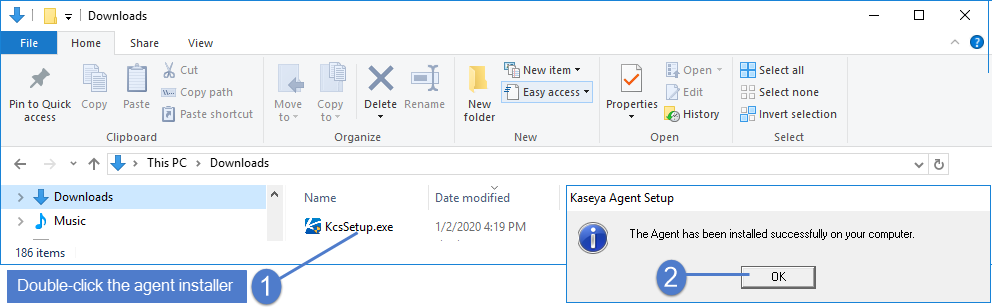
3. In Windows Explorer, browse to the download location and double-click the agent installer, KcsSetup.exe.
The agent is installed.
4. Click OK to close the Agent Setup message.