Remove a backup copy target
Use this procedure to remove a target that is not directly connected physically to the appliance. Applies to these backup copy target types: Unitrends Cloud, Unitrends appliance, third-party cloud, NAS, and SAN.
NOTES
● To remove an iSCSI LUN from the Unitrends appliance, you must go to the SAN manager and indicate that the SAN should no longer use the LUN.
● For targets that are directly connected to the appliance, such as eSATA, USB, and tape devices, you do not remove the target from the UI. Instead, physically disconnect the target.
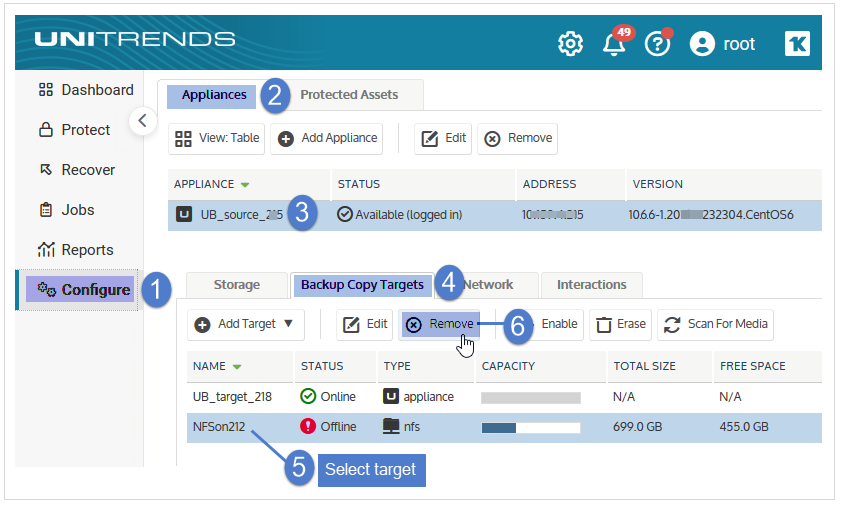
1. On the Configure > Appliances page, select your appliance.
2. Click the Backup Copy Targets tab, and select the target you wish to remove.
3. Click Remove.
NOTE For a Unitrends Cloud or Unitrends appliance target, removing the target also tears down the secure tunnel to that target and removes its tunnel configuration from the source appliance. Tunnels to your other targets are not affected. For details, see WireGuard secure tunnel.
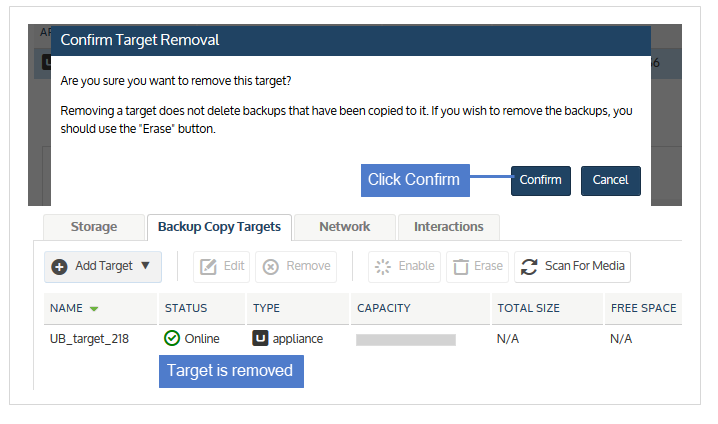
4. Click Confirm.