Unitrends agents
Before you can protect a physical asset, you must install the Unitrends agent. (You can also opt to install the agent on virtual machines if you prefer to use file-level protection.) For most Windows assets, the appliance can push-install the agent when you add the asset. For other physical assets, you must install the Unitrends agent manually before you add the asset.
NOTE A Unitrends agent is not used to protect iSeries assets, For details on iSeries, see iSeries Backups Overview and Procedures.
Agent installation procedures vary by operating system. See the following topics for details:
|
Operating system |
Agent install procedure |
|---|---|
|
Microsoft Windows |
|
|
Linux |
|
|
CentOS |
|
|
Debian |
|
|
Red Hat |
|
|
SUSE |
|
|
Ubuntu |
|
|
Solaris |
|
|
Novell Netware |
|
|
Mac |
|
|
AIX |
|
|
UnixWare |
|
|
HP-UX |
How to see which agent version is in place
Use these steps to see which version of the Unitrends agent is installed on your assets:
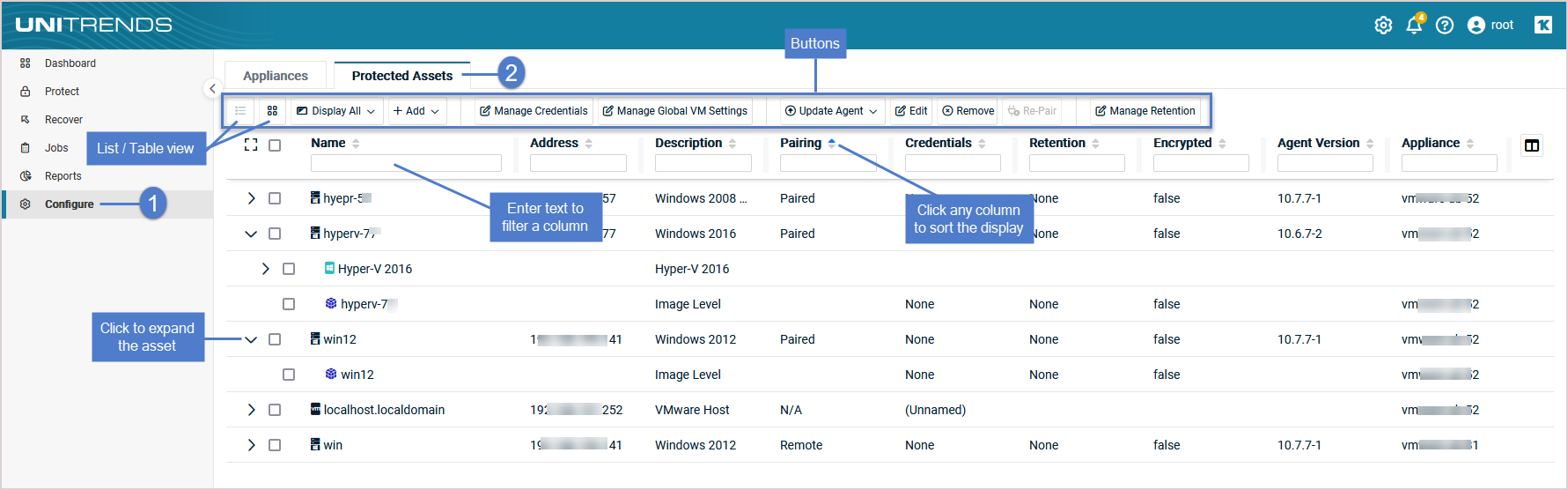
- Log in to your Unitrends appliance.
- Click Configure in the left navigation menu.
- Click the Protected Assets tab.
- See the version listed for each asset in the Agent Version column.
Use these steps to see which version of the Unitrends agent is installed on a protected Windows asset:
- Navigate to the C:\PCBP directory on the protected asset.
- Locate the bpnetd.exe file.
- Right-click on the file, then select Properties.
- Click on the Details tab.
- The agent version is shown.


