Conditional alarms
Conditional alarms let you set a threshold for how long a machine can go without a good backup or good hot backup copy before an alert is sent to you.
If the threshold is exceeded, an alarm is added to the Notifications list in BackupIQ.
To start using conditional alarms, set up thresholds as described in To configure conditional alarms.
BackupIQ conditional alarms can also generate tickets through Autotask, ConnectWise Manage, BMS, and Vorex integrations.
You can also opt to receive email notifications for these alarms.
NOTES How often an alarm is generated depends on the type of asset:
● Unitrends appliance assets : A new alarm is generated each time a scheduled good backup or good hot backup copy is missed.
Alarms, and any tickets created for your integrations, continue to be generated until a good backup or good hot backup copy completes.
● Endpoint Backup v2 and Spanning assets : A single alarm is generated once the threshold period has passed since the last good backup.
No repeating alarms or duplicate tickets are created while the asset remains in an alarmed state.
After the alarm is closed, it is not generated again unless a new good backup completes and the threshold is exceeded again.
Working with conditional alarms
Use these procedures to configure and manage conditional alarms:
To configure conditional alarms
Use this procedure to set alert thresholds against the last good backup and last good hot backup copy.
A good backup or hot backup copy is one that finished with status success or warning.
When a threshold is crossed, an alert is added to BackupIQ, enabling you to quickly prioritize and address alarm conditions.
How often an alert is generated depends on the type of asset.
For details, see How often an alarm is generated.
Configure these thresholds:
- Global Thresholds (required) – Start by setting the global threshold for backups.
Global threshold settings apply to all assets that do not have a custom threshold assigned.
Global thresholds are applied across all organizations. - Unitrends Thresholds – Set the threshold for off-site replication.
This section appears below Global Thresholds in the same dialog, and the threshold applies to Unitrends appliances only. - Custom Thresholds (optional) – Create custom thresholds that you can quickly apply to one or more organizations.
Custom thresholds take precedence over global thresholds.
NOTES
● You must be logged in to UniView Portal as a superuser to create or modify conditional alarms.
● You can also send conditional alarms to your VSA 9 environment.
After configuring alarms in the UniView Portal, continue to To display conditional alarms in the Kaseya VSA 9 Remote Monitoring and Management Solution.
Use these steps to configure conditional alarms:
- Click the BackupIQ icon in the upper-right corner.
- Click the
 icon.
icon. 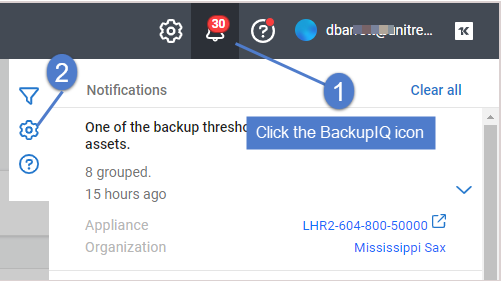
- Click
 to view threshold settings.
Backups are configured in the Global Thresholds section (Backups toggle).
off-site replication is configured in the Unitrends Thresholds section (Replication off-site (Unitrends only) toggle) and applies to Unitrends appliances only.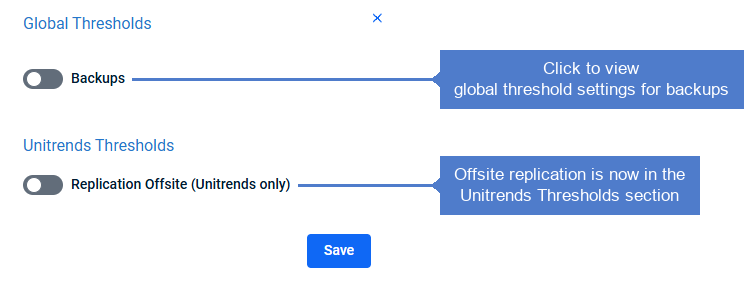
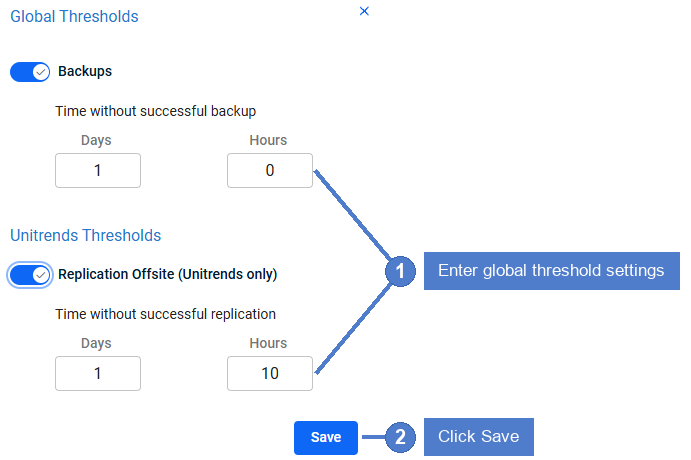
- Enter Global Thresholds settings and click Save.
In this example, a backup alarm is generated if a good backup does not complete within 1 day of the job's scheduled start time.
A hot backup copy alarm is generated if a good backup is not copied within 1 day and 10 hours of the backup job's end time.
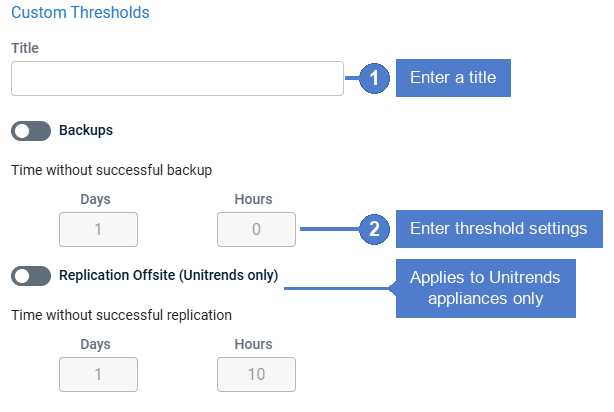
- (Optional) Add a custom threshold and apply to organizations:
NOTE Each organization can be assigned one custom threshold.
- Click + Create New:
- Enter a Title.
Click to enable the Backups and/or Replication off-site (Unitrends only) toggles.
Enter threshold settings.
Add one or more organizations.
Click Save:- The custom threshold is added.
When alarms are generated, they are added to the Notifications list in BackupIQ, as shown here: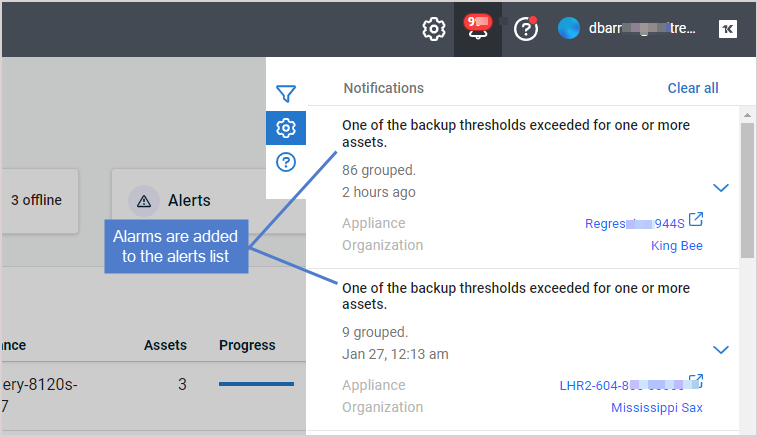
View alarm details to determine root cause and next steps.
These conditions are checked:
- appliance status
- last good backup
- backup job schedule
- last good hot backup copy
- hot backup copy schedule
Alarm details in the BackupIQ Notifications list: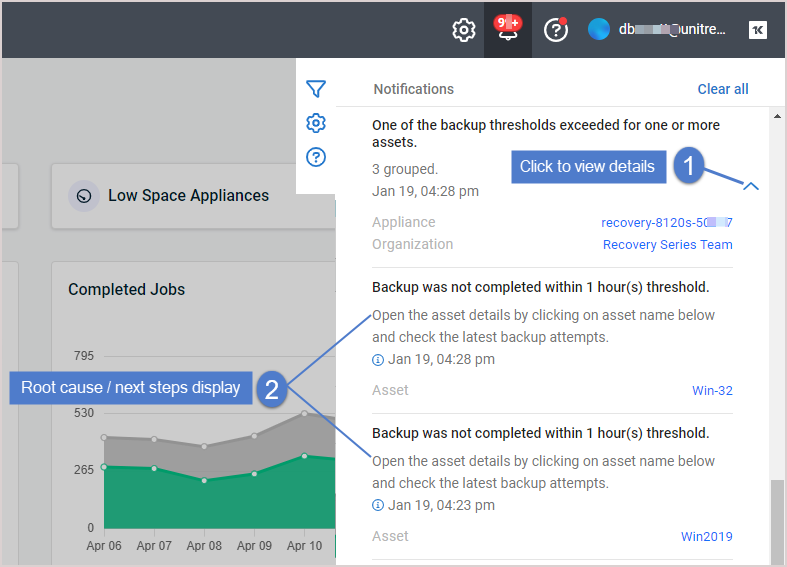
To view or modify conditional alarm settings
Use these steps to view or modify conditional alarms:
NOTE You must be logged in to UniView Portal as a superuser to create or modify conditional alarms.
- Click the BackupIQ icon in the upper-right corner.
- Click the icon.
- (Optional) Modify Global Thresholds settings and click Save:
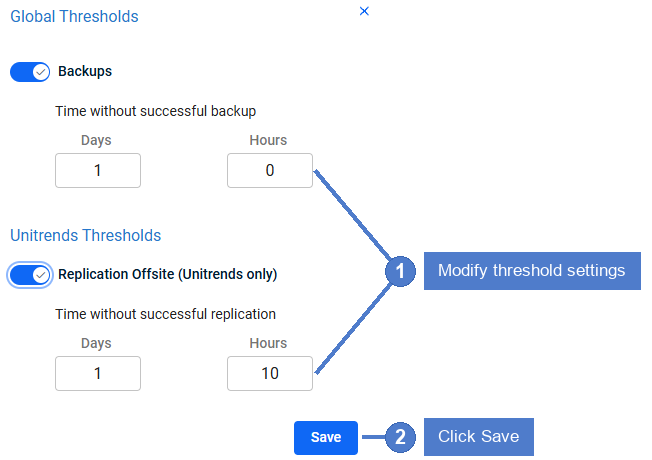
- (Optional) Modify Custom Thresholds settings:
- Select the custom threshold.
- Modify the title or threshold settings.
- Add or remove organizations.
- Click Save.
To delete a custom threshold
NOTE You must be logged in to UniView Portal as a superuser to delete a custom threshold.
- Click the BackupIQ icon in the upper-right corner.
- Click the icon.
- Select the custom threshold.
- Review the organizations list.
Organizations to which this custom threshold has been assigned display at the top of the list.
Upon deleting the custom threshold, global thresholds are applied to any associated organizations. - Click Delete, then Confirm.
The threshold is removed.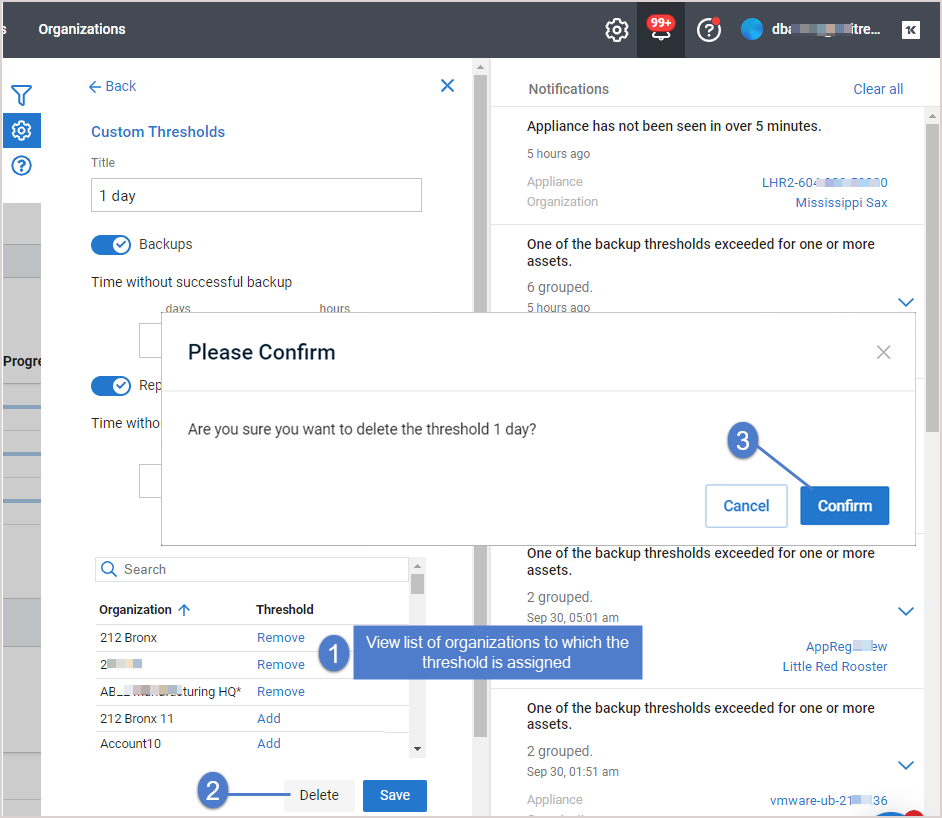
Kaseya Virtual System Administrator (VSA) 9
If you use Kaseya VSA 9, you can add UniView conditional alarms to your VSA so you can view them along with your other VSA notifications as well as set up VSA email alerts.
NOTE Alerts and conditional alarms are not yet supported for VSA 10 environments.
To display conditional alarms in the Kaseya VSA 9 Remote Monitoring and Management Solution
Conditional alarms can be configured to display as system alerts in your VSA 9 environment: 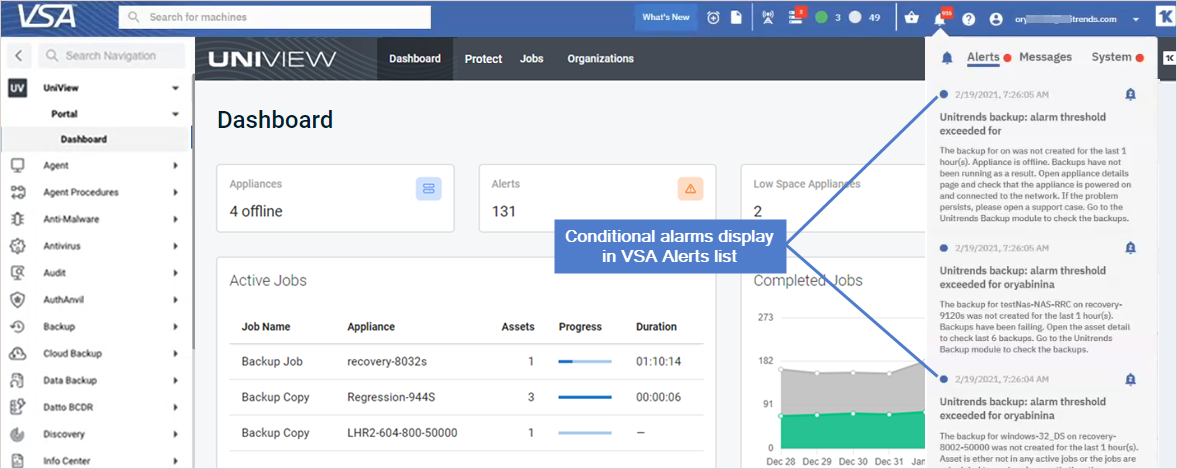
To add conditional alarms to your VSA 9 environment
NOTE Alerts and conditional alarms are not yet supported for VSA 10 environments.
- Ensure that these requirements have been met:
- Conditional alarms have been configured in the UniView Portal (as described inTo configure conditional alarms).
- VSA 9 is running release 9.5.0.28 or higher.
- VSA is accessible on the Internet.
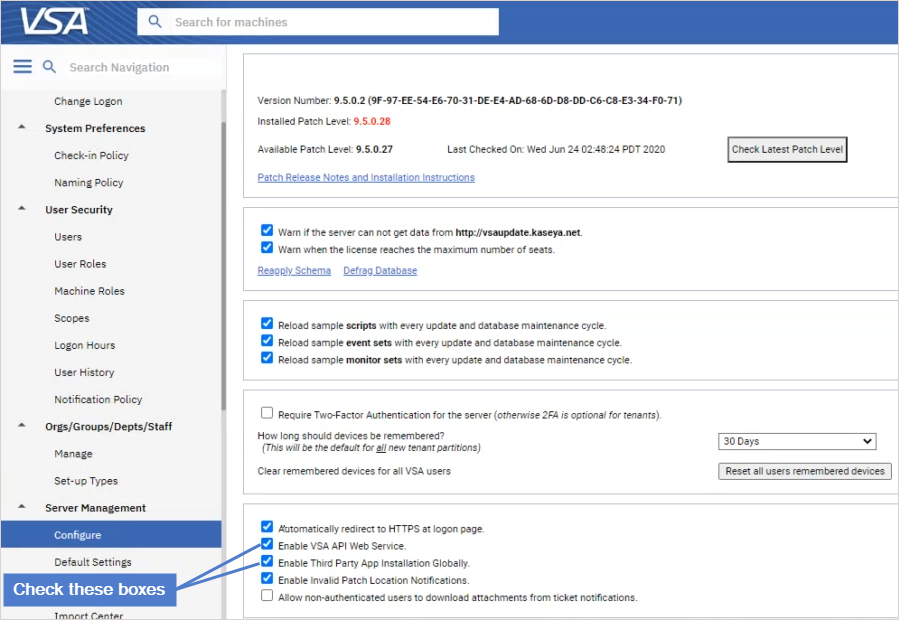
If you have an on-premise VSA instance that does not have Internet access, UniView Portal cannot send conditional alarms to the VSA.- These options are enabled in the VSA: Enable VSA API Web Service and Enable Third Party App Installation Globally.
These options are located on the System > Server Management > Configure page:- The roles and groups shown below are enabled.
Enable these on the VSA System > User Security > User Roles page.
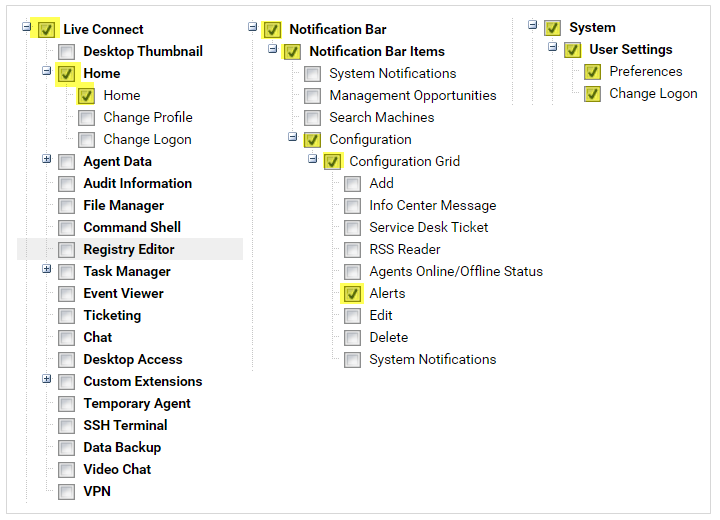
- Add the VSA integration as described in Integrating VSA 9.
NOTES
● If you have already integrated an older VSA version, you must remove this integration, then add a new one using the latest TAP module.
The Integrating VSA 9 procedure includes steps to remove the existing integration.● If the logos and branding you see in your currently deployed VSA module do not look like this new UniView module, you may be using a prior version of the TAP module for the Unitrends Backup Portal platform.
As of January 2023, module branding has been modified, but no other functional changes exist.
We do not recommend customers uninstall the older module to use the newer module as this will impact existing mappings (e.g., UniView user accounts mapped to KaseyaOne accounts for single sign-on, and assets mapped to VSA IDs).
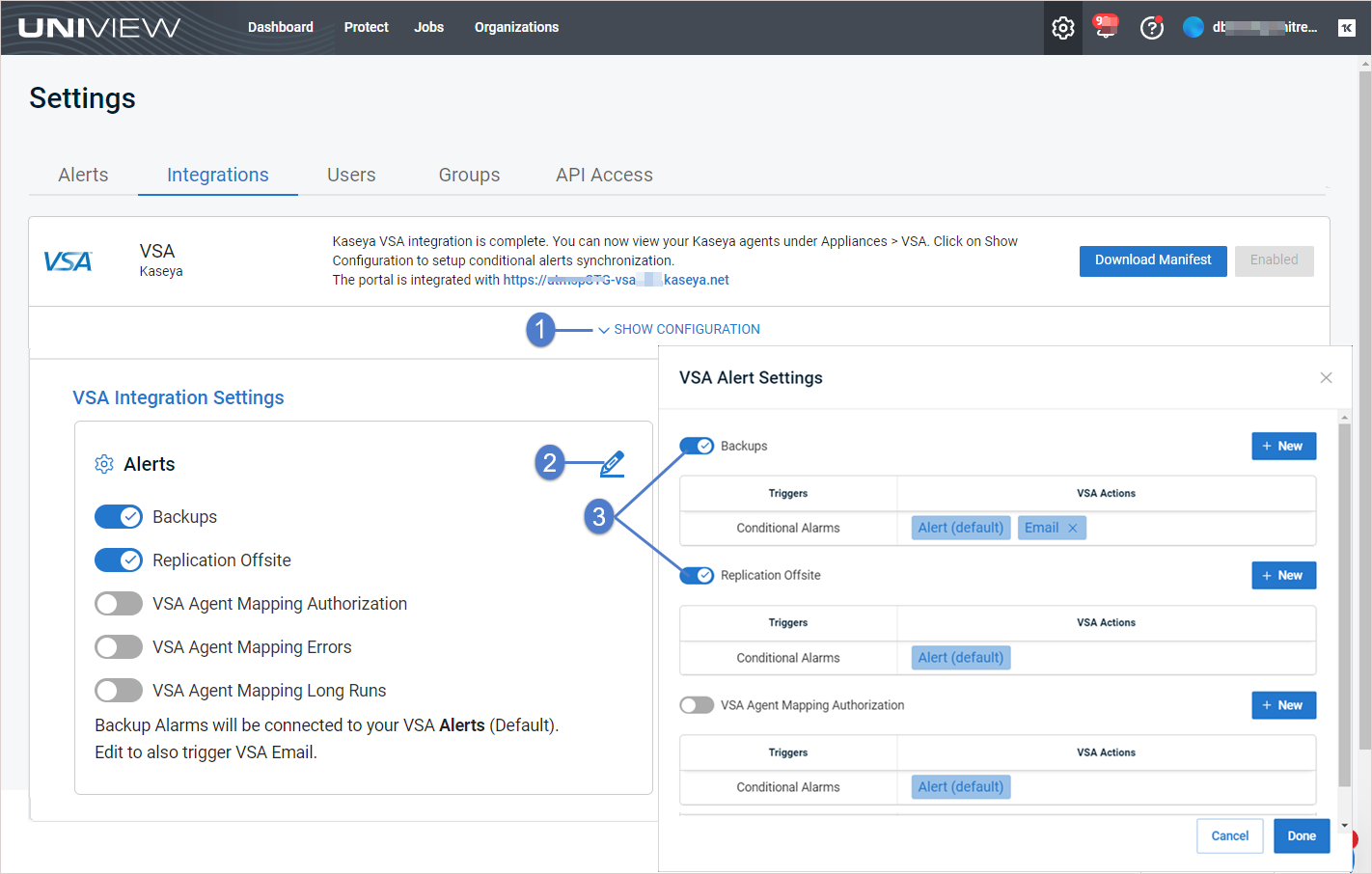
- Enable VSA alerts in the UniView Portal:
- In the UniView Portal, click
:
- Select the Integrations view.
- Locate the VSA integration and click Show Configuration.
- In the Alerts section, click
.
- In the VSA Alert Settings dialog, click the
- To finish the configuration, log in to the VSA and launch the UniView module.
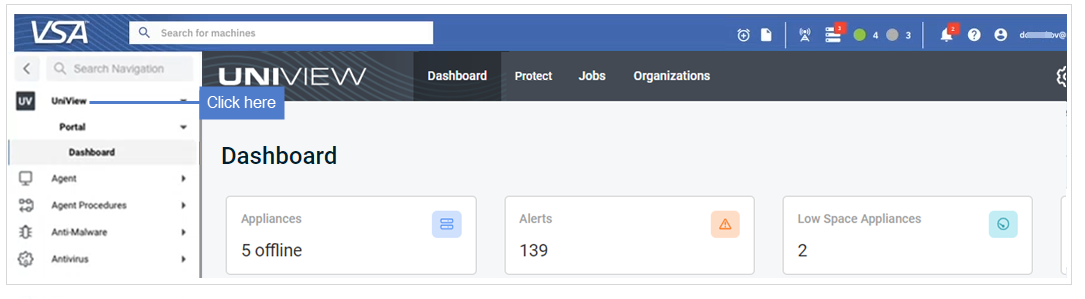
NOTE If prompted, enter your UniView Portal credentials and click Log in.
Click Allow to grant UniView Portal access to the VSA instance.
To add VSA 9 email alerts for conditional alarms
Use this procedure to configure VSA email alerts for conditional alarms.
NOTE Alerts and conditional alarms are not yet supported for VSA 10 environments.
- Ensure that these prerequisites have been met:
- Conditional alarms have been configured, as described inTo configure conditional alarms.
- Conditional alarms have been added to the VSA, as described in To display conditional alarms in the Kaseya VSA 9 Remote Monitoring and Management Solution.
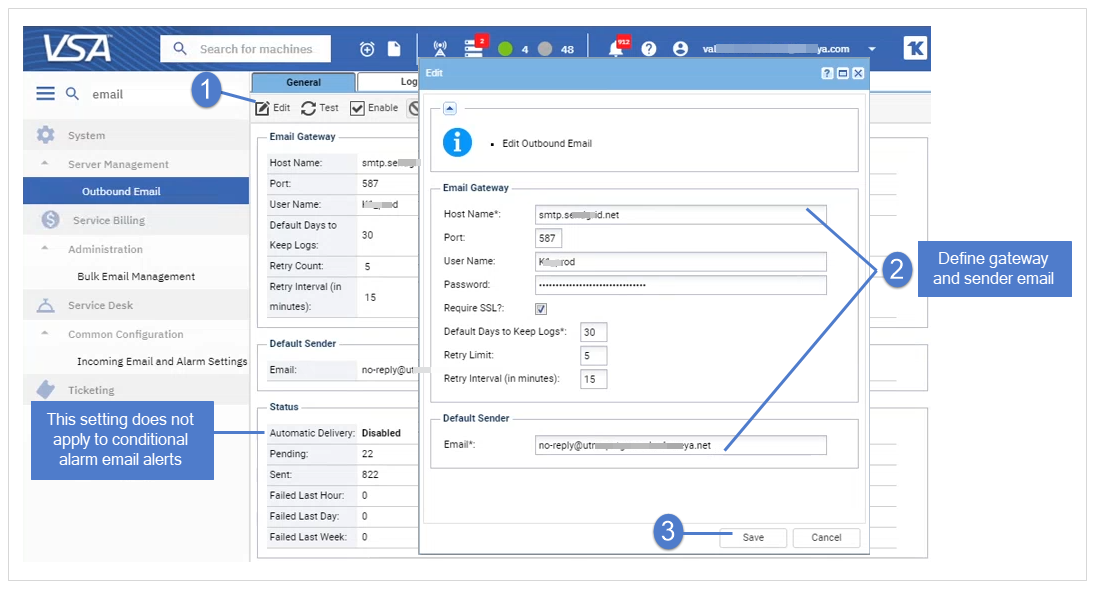
- (On-premise VSA instance only) An SMTP server has been configured on the VSA System > Server Management > Outbound Email page.
To configure an SMTP server, click Edit, enter settings, then click Save.
Outbound Email fields include:
- Host Name – The name of the host email server.
Example: smtp.mycompany.com.
If no authentication or special port number is required, then only specify values for the Default Days to Keep Logs and Default Sender Email fields.NOTE Enter localhost in the Host Name field to use the Kaseya Server's IIS Default SMTP Virtual Server to route outbound email.
The Default SMTP Virtual Server service must be installed and running in order to send email.
The service must also be able to resolve DNS addresses to route email to other SMTP servers.
- Port – Typically 25, but the host email server may require a different port number.
Ports 465 and 587 are typically used for connecting to an SMTP email server over SSL/TLS.- User Name – If required for authentication, enter the username of an account authorized to use the host email server.
- Password – If required for authentication, enter the password of the account.
- Default Days to Keep Logs – Enter the number of days to keep log outbound email entries.
- Default Sender Email – Enter the default From address displayed by outbound email.
- In the UniView Portal, click :

- Select the Integrations view.
- Locate the VSA integration and click Show Configuration.
- Click to edit VSA integration settings.
-
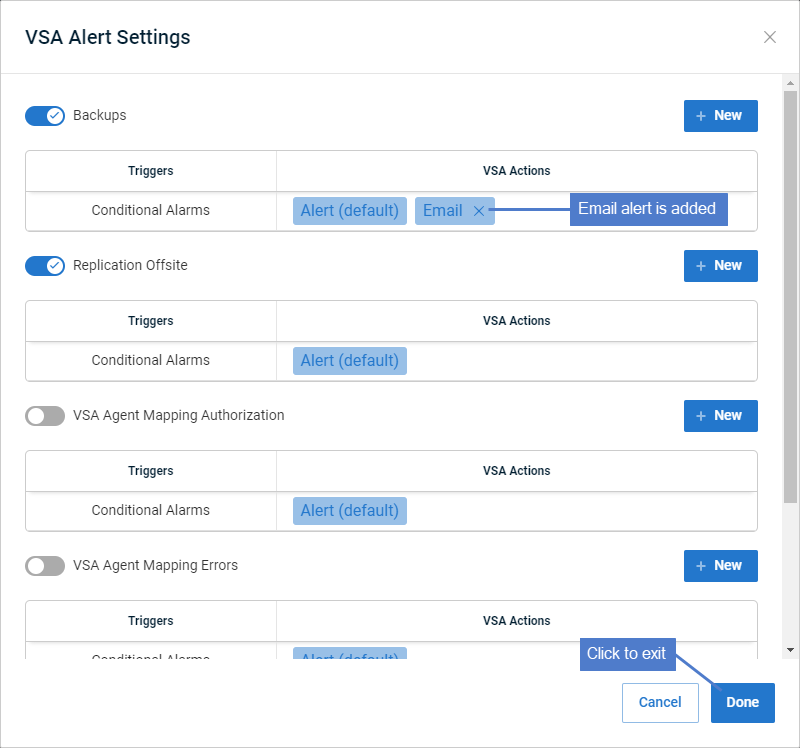
Click New + in the Backups area to configure email alerts for backups or click New + in the Replication off-site area to configure email alerts for hot backup copies.
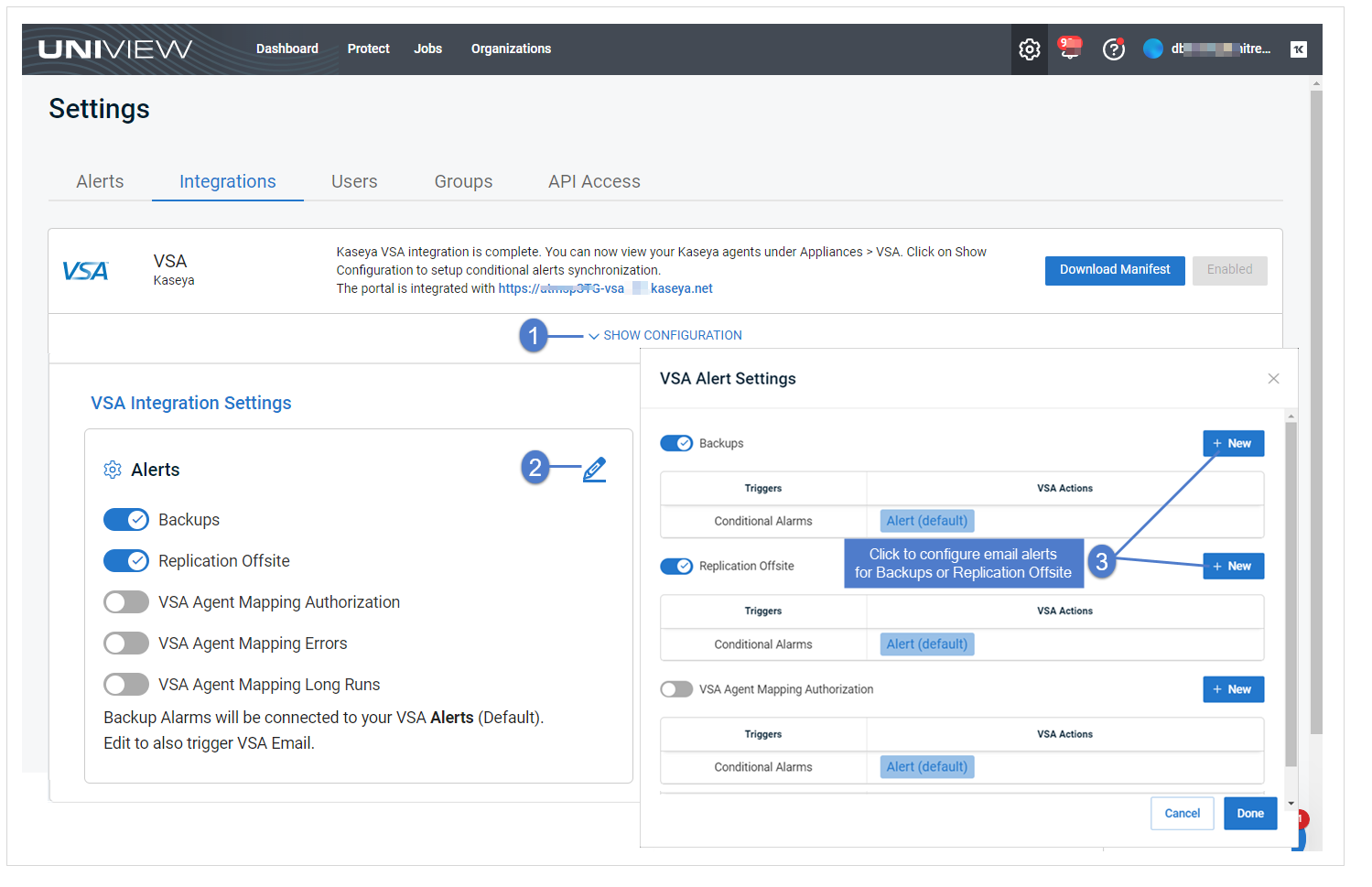
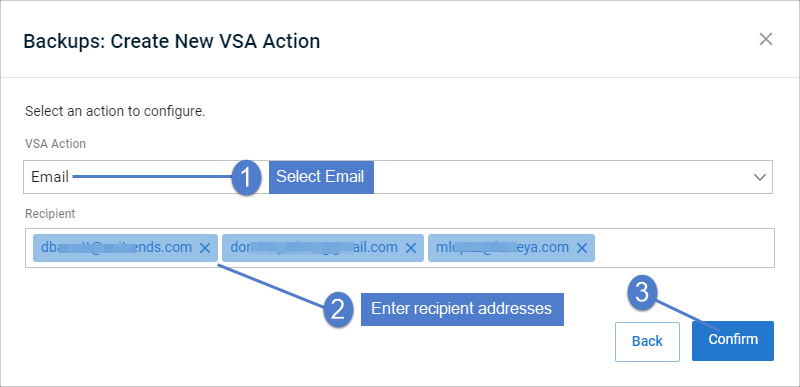
- In the Create New VSA Action dialog, select Email from the VSA Action list.
- Enter one or more Recipient email addresses.
- You can enter addresses by typing or by using copy/paste keyboard shortcuts (Ctrl+C and Ctrl+V).
- If entering multiple addresses, you must enter a comma or space between each address.
- Click Confirm.
- The Email alert is added.
NOTE VSA Actions are user specific.
The email alert that you added displays for your user account only.
If another user logs in to the UniView Portal, the VSA Actions that were added by your user account do not display.
Because of this, it is possible that another user may create a duplicate VSA action.
- (Optional) Repeat this procedure from Step 6 to add email alerts to the other job type.
- Click Done to exit.
An email alert is sent if the conditional alarm threshold is reached.
Sample conditional alarm email alert: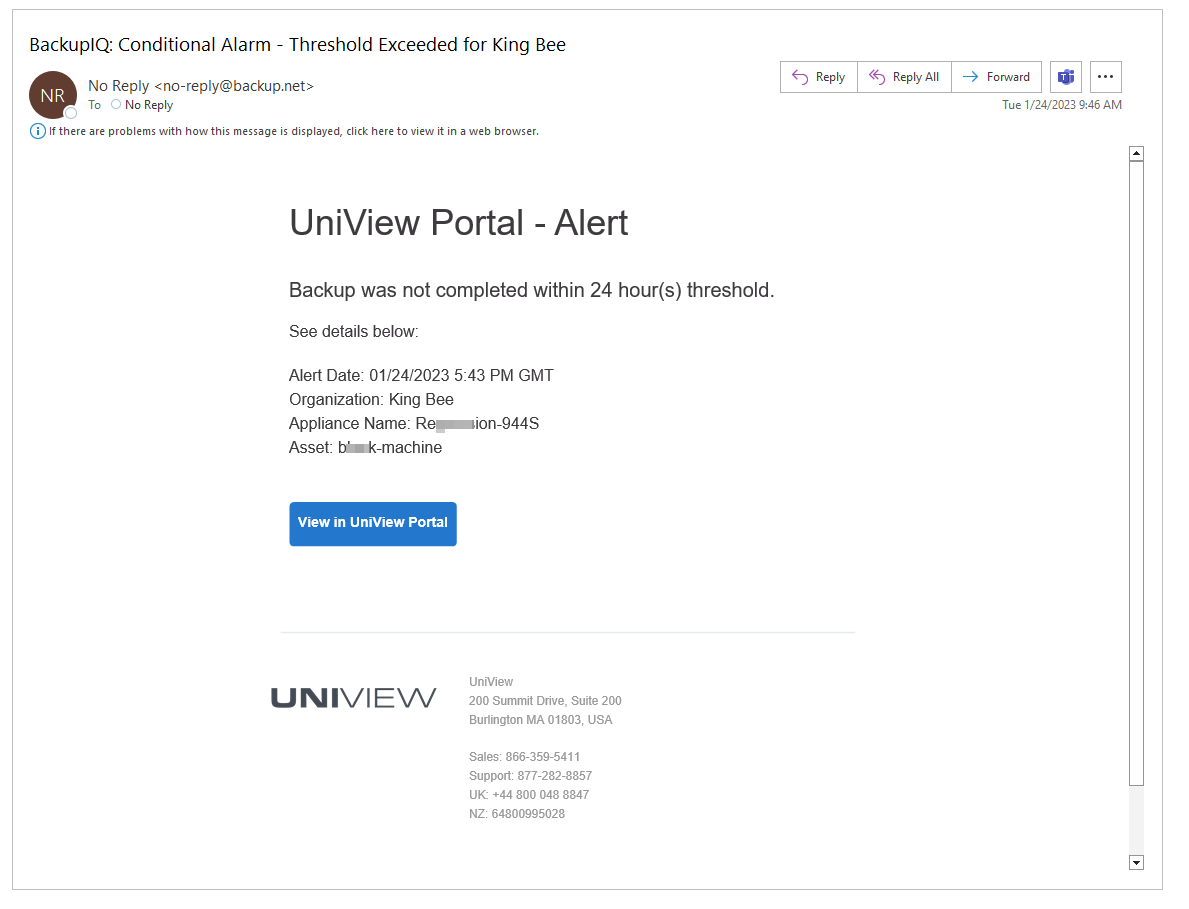
To view or edit VSA 9 email alerts for conditional alarms
- In the UniView Portal, click :
- Select the Integrations view.
- Locate the VSA integration and click Show Configuration.
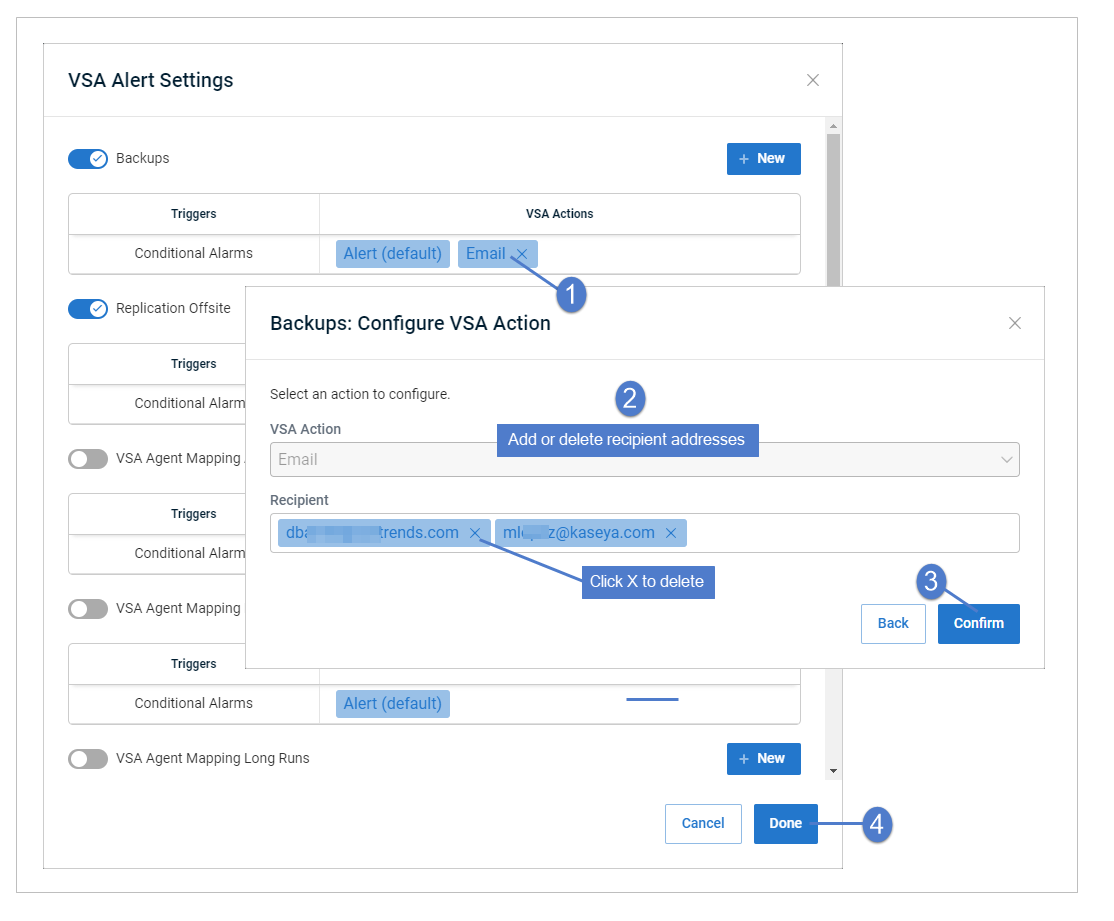
- Click to view or edit VSA integration settings.
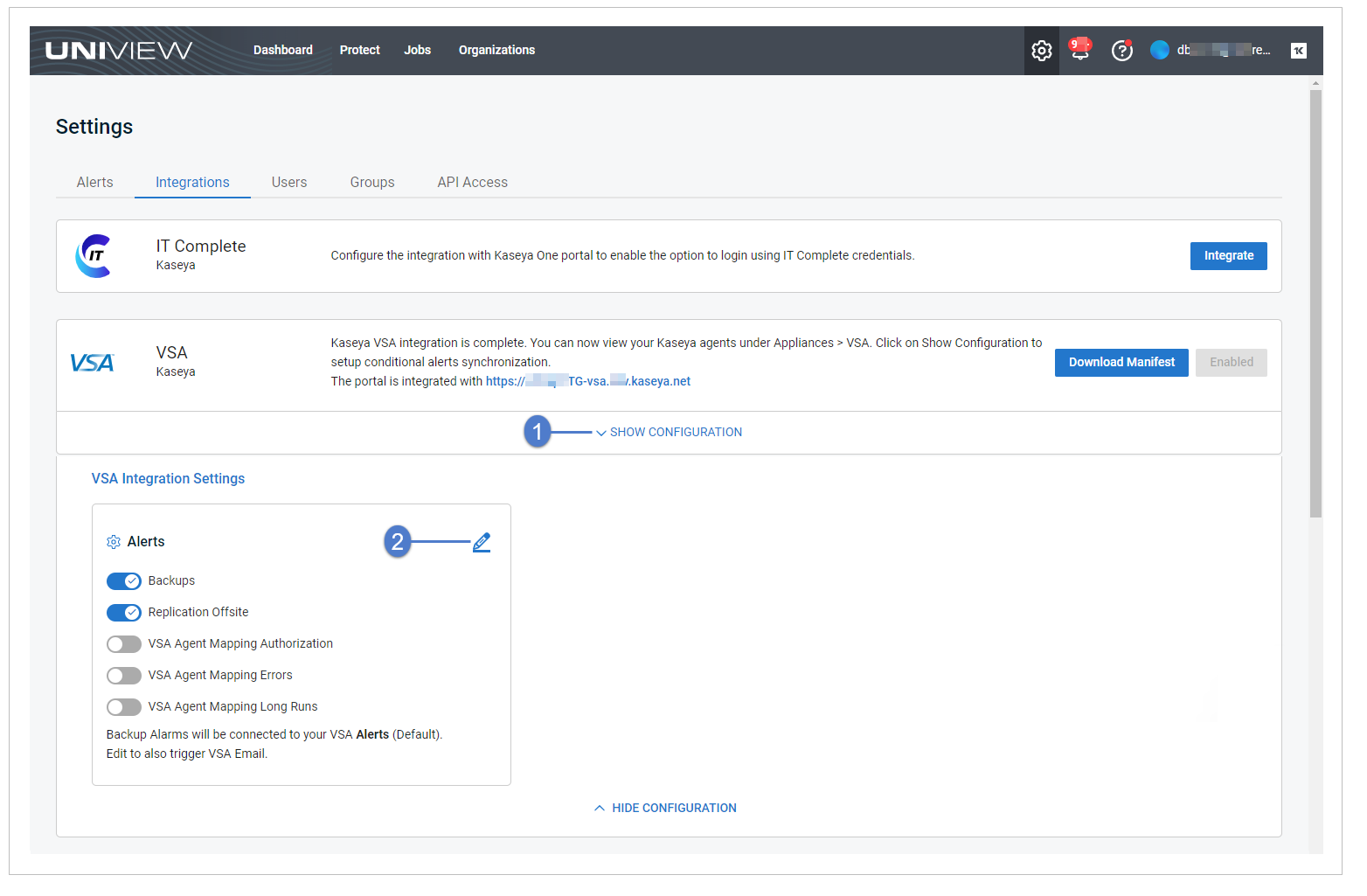
- Click Email to view or edit the VSA action.
- (Optional) Add or remove Recipient email addresses, then click Confirm.
Click Done to exit.
- You can enter addresses by typing or by using copy/paste keyboard shortcuts (Ctrl+C and Ctrl+V).
- If entering multiple addresses, you must enter a comma or space between each address.
- To delete an email address, click its X.
To remove VSA 9 email alerts from conditional alarms
- In the UniView Portal, click :
- Select the Integrations view.
- Locate the VSA integration and click Show Configuration.
- Click to edit VSA integration settings.
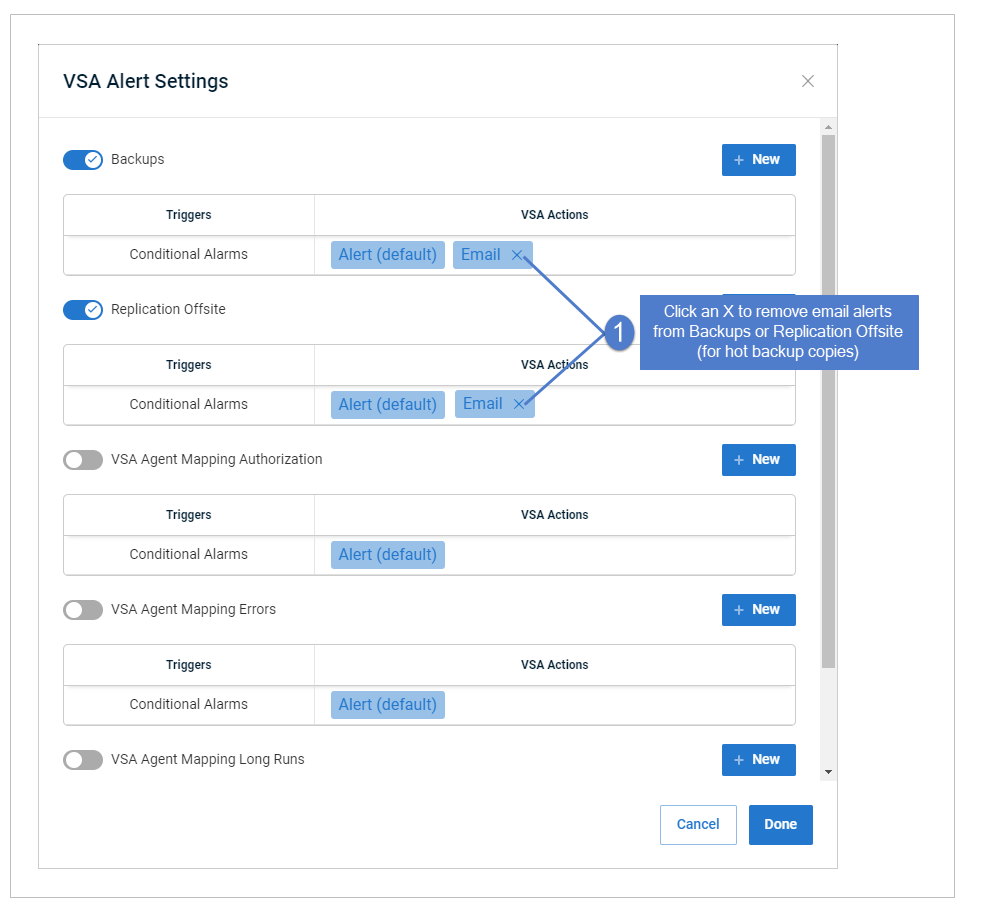
- Locate the Email conditional alarm in the Backups area or the Email conditional alarm in the Replication off-site area (for hot backup copies).
Click its X to remove the email alert.
Click Done to exit.